


Optimize WordPress Themes: Optimizing your WordPress theme is crucial for improving performance and enhancing user experiences. Increased website speed can be crucial to the success of your business. Your website’s ranking in search results will increase with its speed, which will also draw more visitors, lower its bounce rate, and aid in boosting visitor-to-customer conversions. The speed of your website ought to be your top priority as a website owner.
There are a few things you can do to speed up a website, like caching, database optimization, and image compression. Numerous plugins are available that can each help with caching your website, optimizing the database, and compressing your images. There used to be no single plugin that could perform all of these functions, so you would have had to install a different plugin for each of these tasks.
This has changed now that WP-Optimize is involved; all of the aforementioned features are available in a single, useful plugin. Eliminate the hassle of utilizing and caring for multiple plugins while crossing your fingers that none of them have security flaws. You can significantly improve your website’s speed with WP-Optimize by simply installing a single, safe plugin.
Let’s dive into the steps to optimize your theme using the WP-Optimize plugin:
1. Install and Activate WP-Optimize:


- First, make sure you have the WP-Optimize plugin installed. If not, you can find it in the WordPress plugin repository.
- Activate the plugin from your WordPress dashboard.
2. Cache Your Site & Optimize WordPress Themes:
Caching significantly speeds up page load times. WP-Optimize provides easy caching options:
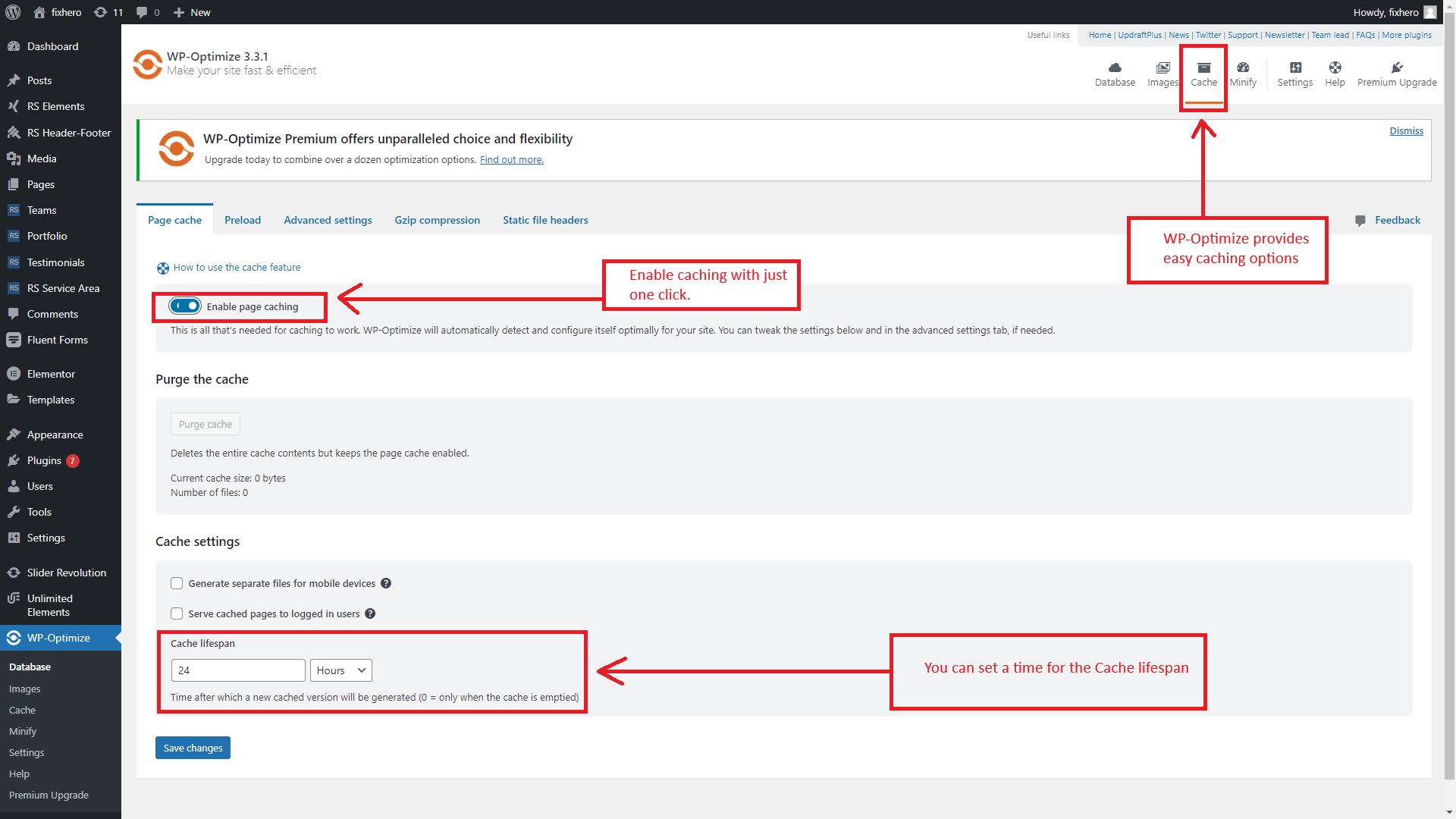
- Enable caching with just one click.
- Configure additional cache settings, such as cache preloading and GZIP compression.
- Consider turning on cache for logged-in users if your content remains the same for them.
- Exclude specific content from caching if needed.
3. Compress Images:


Large images can slow down your site. WP-Optimize helps you identify and compress images:
- Navigate to WP-Optimize > Images.
- Identify images that need compression.
- Optimize images based on your preferred lossy or lossless settings.
4. Clean and Optimize the Database:

Your WordPress database accumulates unnecessary data over time. WP-Optimize handles this:
- Go to WP-Optimize > Database.
- Select all tables and optimize them.
- Regularly clean up your database to save server resources.
5. Minify CSS and JavaScript:
In addition to caching, WP-Optimize offers advanced minification:
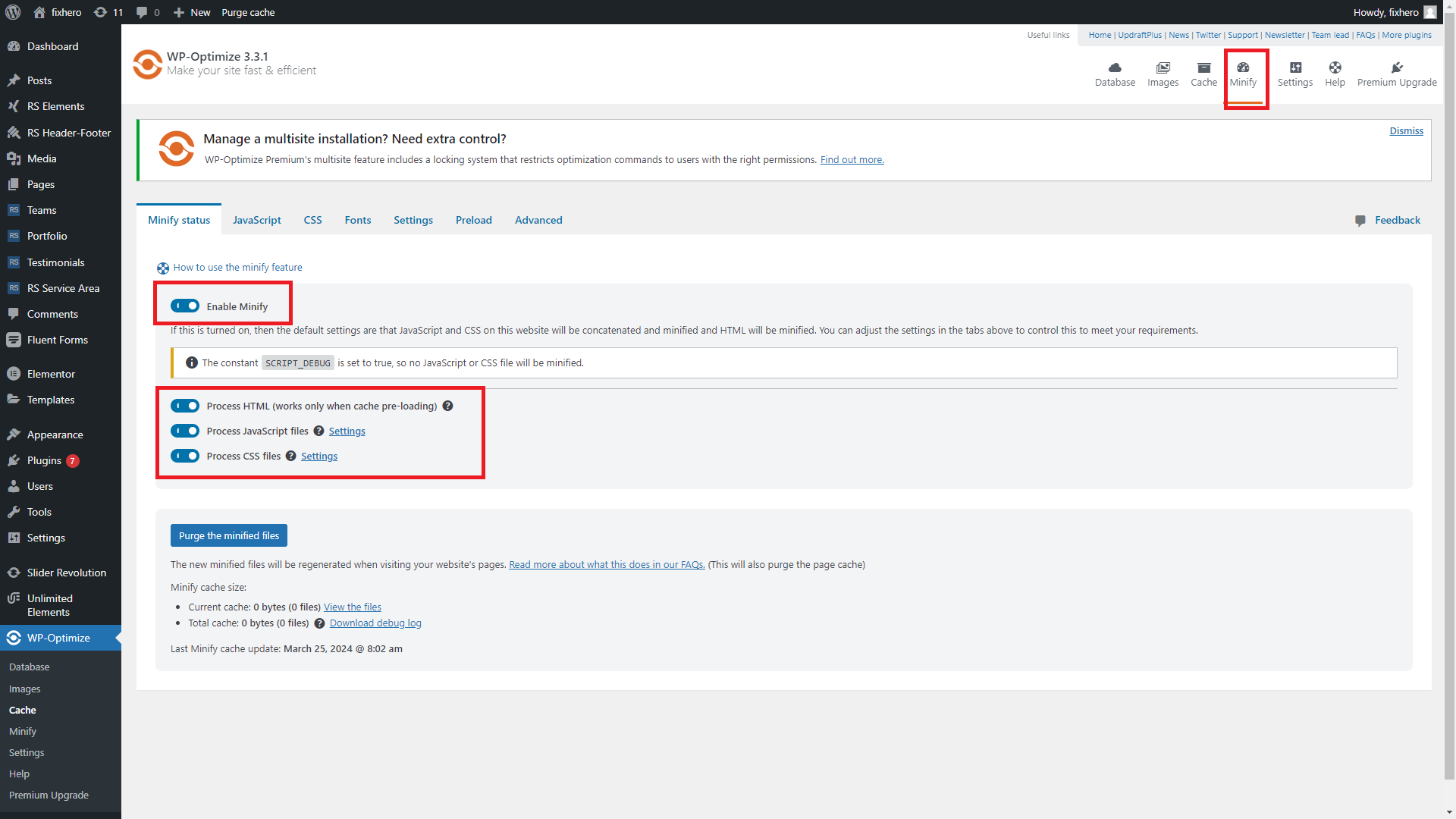
- Minify CSS and JavaScript files to reduce their size.




- Combining minification with caching significantly improves performance.
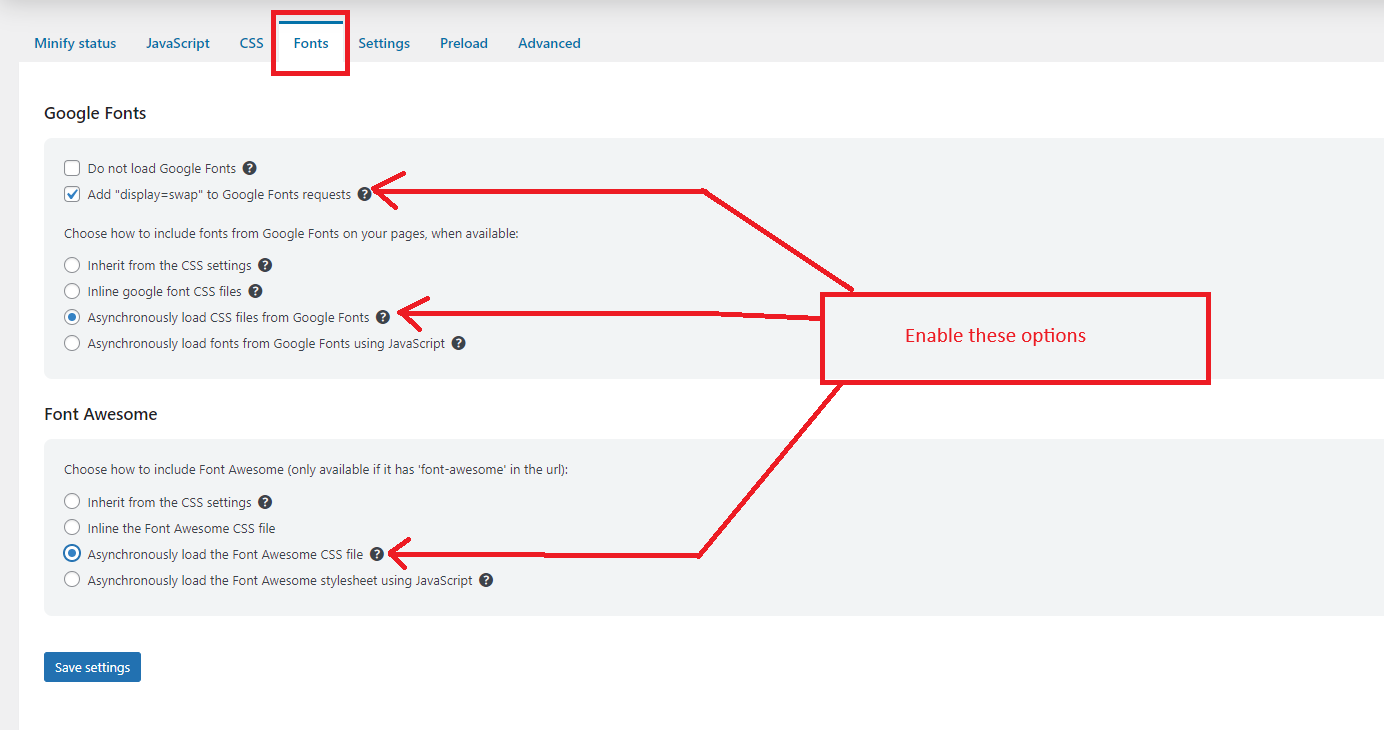
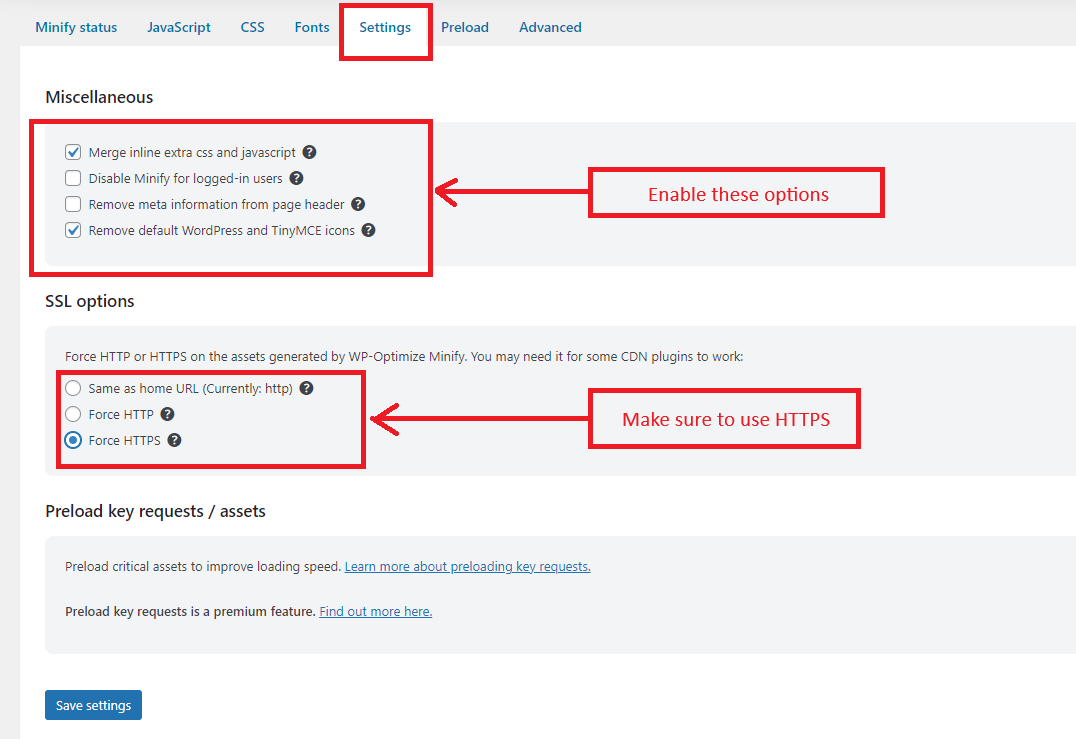
- Minify Fonts and Settings


Remember to take a backup before optimizing your database to ensure data safety. WP-Optimize is a powerful tool trusted by over a million WordPress website owners, so follow these steps to enhance your site’s speed and overall performance!
RSTheme’s all theme developed by Elementor. Now we will explore how to optimize your website using Elementor, a popular WordPress page builder. Optimizing your website ensures better performance, faster loading times, and an improved user experience. Here are some steps to optimize your Elementor-based site:
6. Layout Optimization Best Practices:
- Efficient Page Structure: Avoid using excessive sections, columns, inner sections, and widgets. Opt for fewer elements to improve performance.
- Test and View Performance: Regularly test your website’s performance using tools like Lighthouse or GTmetrix.
- Optimize Header, Footer, and Page Content: Streamline your design by eliminating unnecessary elements.
- Good vs. Bad Practice Layouts: Understand common misuses of sections, columns, and widgets to create optimal layouts.
- Positioning and Global Styles: Use widgets wisely and apply global styles for consistency.
- Minimize DOM Elements: Reduce the number of elements in your Document Object Model (DOM) for faster rendering.
7. Optimize Your Images and Optimize WordPress Themes:
- Image Compression: Use tools like WP-Optimize to compress images without compromising quality.
- Choose the Right Format: Use JPEG for photographs and PNG for graphics with transparency.
- Lazy Loading: Enable lazy loading to load images only when they come into view. Elementor>Settings>Feature
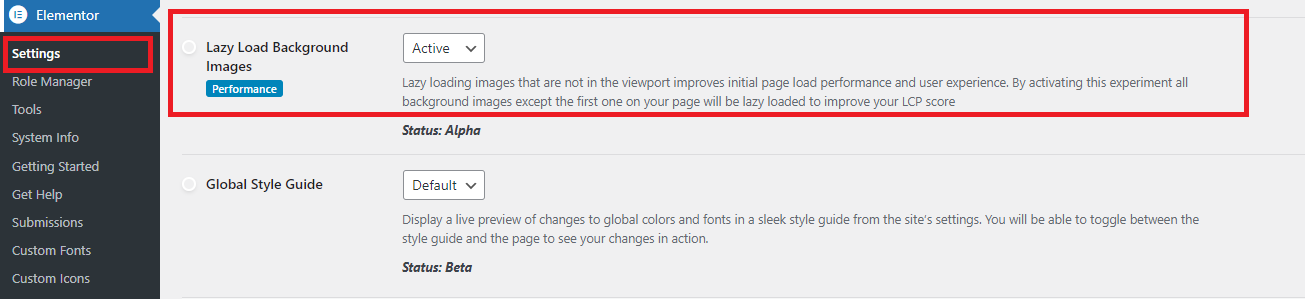

- Image Dimensions: Resize images to their display dimensions to avoid unnecessary overhead.
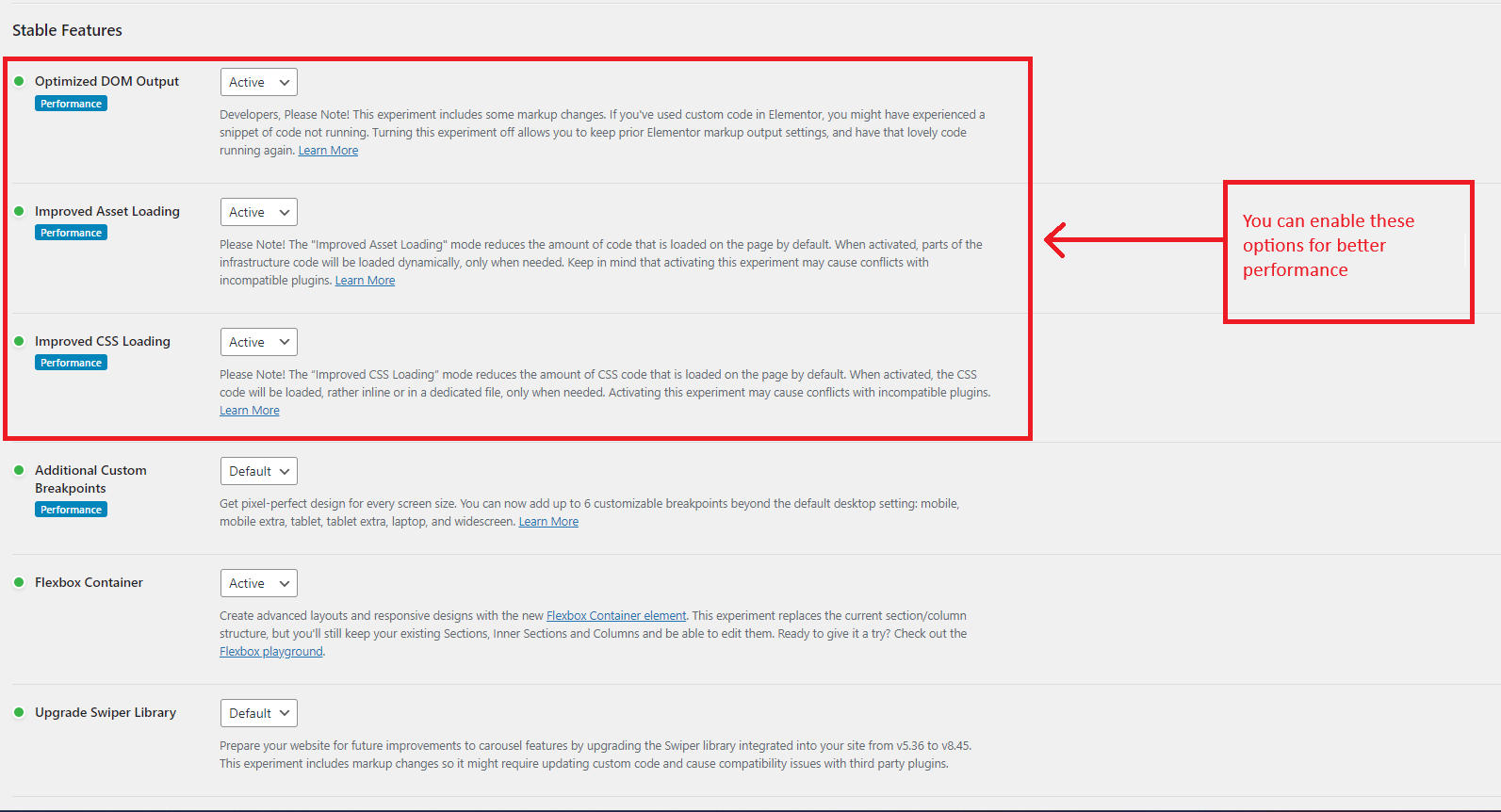
- Stable Features: In this settings we got good result after enable it. You can enable it or not. Elementor>Settings>Feature

8. Additional Performance Boosts:
- Caching: Implement browser caching to store static files locally.
- Minify CSS and JavaScript: Reduce file sizes by removing unnecessary characters.
- GZIP Compression: Enable server-side compression for faster data transfer.
- CDN (Content Delivery Network): Use a CDN to distribute content across multiple servers globally.
9. Clean WP Optimize Cache
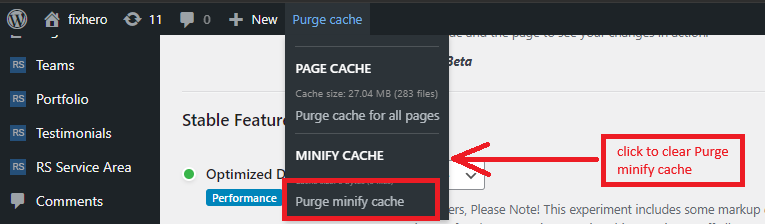
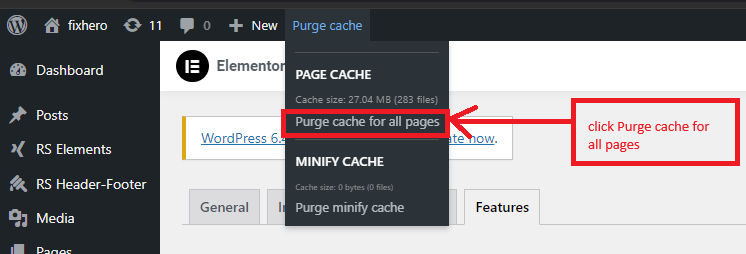
In order to clear the WP Optimize plugin cache, please follow these steps.
- click to clear Purge minify cache

- click Purge cache for all pages

Choose a Suitable Web Host:
- Opt for a reliable hosting provider with good server performance.
- Consider managed WordPress hosting for optimized server configurations .
10. Third-Party Tools:
- Explore tools like WP Rocket, Autoptimize, and WP Super Cache for additional optimizations.
- Integrate with popular SEO plugins like Yoast SEO or Rank Math for on-page SEO improvements.
Remember to monitor your website’s performance regularly and adjust settings as needed. By following these steps, you’ll create a faster, more efficient Elementor website!