RS Scroll To Seat is a scroll-driven animation extension for Elementor that moves any element from its original position to a specific point on the page as the user scrolls. Unlike a simple parallax effect, this extension gives you precise control over where the movement starts, where it ends, and how the element transforms along the way.
You can move and scale any section, column, or widget smoothly tied to the scroll position. The end point can be defined either by a fixed pixel distance or by targeting another element on the page using a CSS selector, making it flexible enough to sync with your page layout.
It works on sections, columns, and widgets, and all controls are responsive so you can fine-tune the behavior separately for desktop, tablet, and mobile.
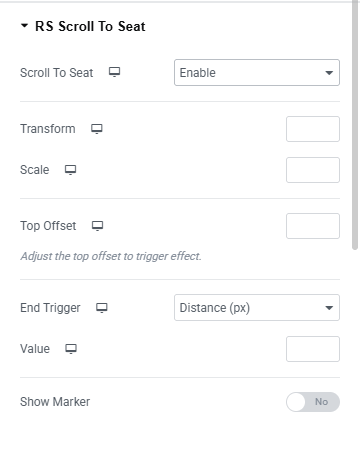
Scroll To Seat Enables a scroll-driven movement effect on the element. When enabled, the element moves (translates) from its original position to a target position as the user scrolls down the page. You will find two options: Disable and Enable.
Transform Sets how far the element moves (in pixels) along the Y axis as the user scrolls. A positive value moves it downward, a negative value moves it upward. This control is responsive.
Scale Scales the element as the user scrolls. A value of 1 is the original size, 0.5 is half size, 2 is double size. Use decimal steps (e.g. 0.5, 1.2). This control is responsive.
Top Offset Adjusts the scroll position (in pixels from the top of the viewport) at which the effect starts triggering. Use this to delay the effect until the element reaches a certain point on screen. This control is responsive.
End Trigger Determines how the scroll effect knows when to stop. You will find two options: Distance (px) and CSS Selector.
Distance (px): The effect ends after scrolling a fixed number of pixels. CSS Selector: The effect ends when a specific element (identified by a CSS selector) enters the viewport.
Value Sets the distance in pixels after which the scroll effect ends. Only available when End Trigger is set to Distance (px). This control is responsive.
Selector Enter the CSS selector of the element that acts as the end trigger. Accepts ID or class selectors (e.g. #end-trigger-1 or .end-trigger-1). Must be a unique selector on the page. Only available when End Trigger is set to CSS Selector.
Buffer Sets the position of the selector element on the viewport (0–150) at which the effect stops. For example, a value of 50 means the effect ends when the target element reaches the middle of the viewport. Only available when End Trigger is set to CSS Selector.
Show Marker Displays visual markers on the page indicating where the scroll effect starts and ends. Useful during setup to confirm the trigger points are correct. Disable before publishing.